

Every time you run a Celery task, push to SQS, or trigger a GitHub Actions workflow, you are using a task queue. It is the backbone of async processing in every production system. A user clicks “export report” and your API returns immediately while a background worker picks up the job.
Today we build one from scratch. A priority task queue with worker threads, retry logic, and dead letter handling.
The 3-Question Framework
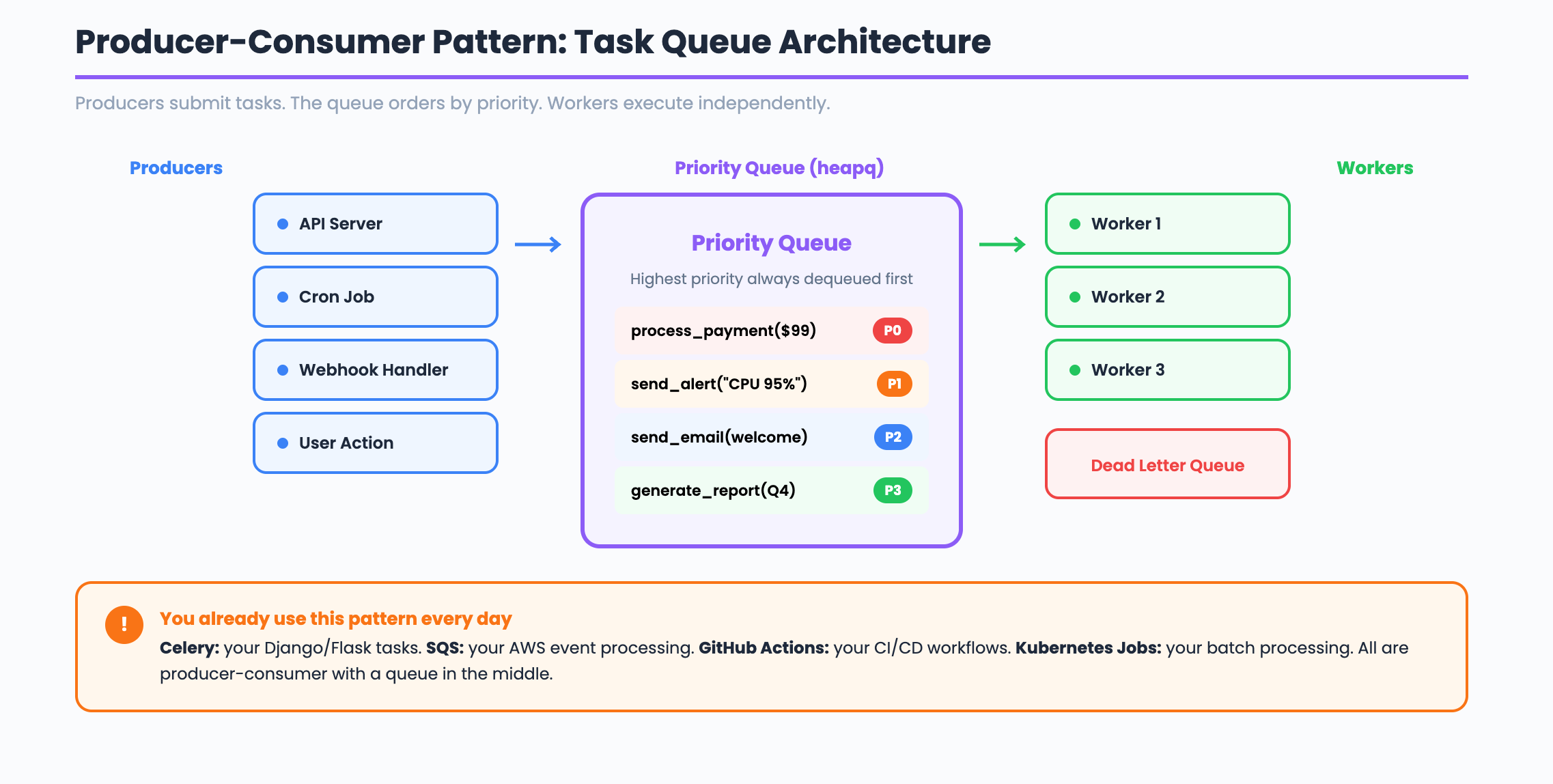
What does the system DO? It decouples producers (who submit tasks) from consumers (who execute them). This is the Producer-Consumer pattern. Producers push tasks into a queue. Workers pull tasks and execute them independently. The queue sits in the middle and handles ordering, priority, and delivery guarantees.
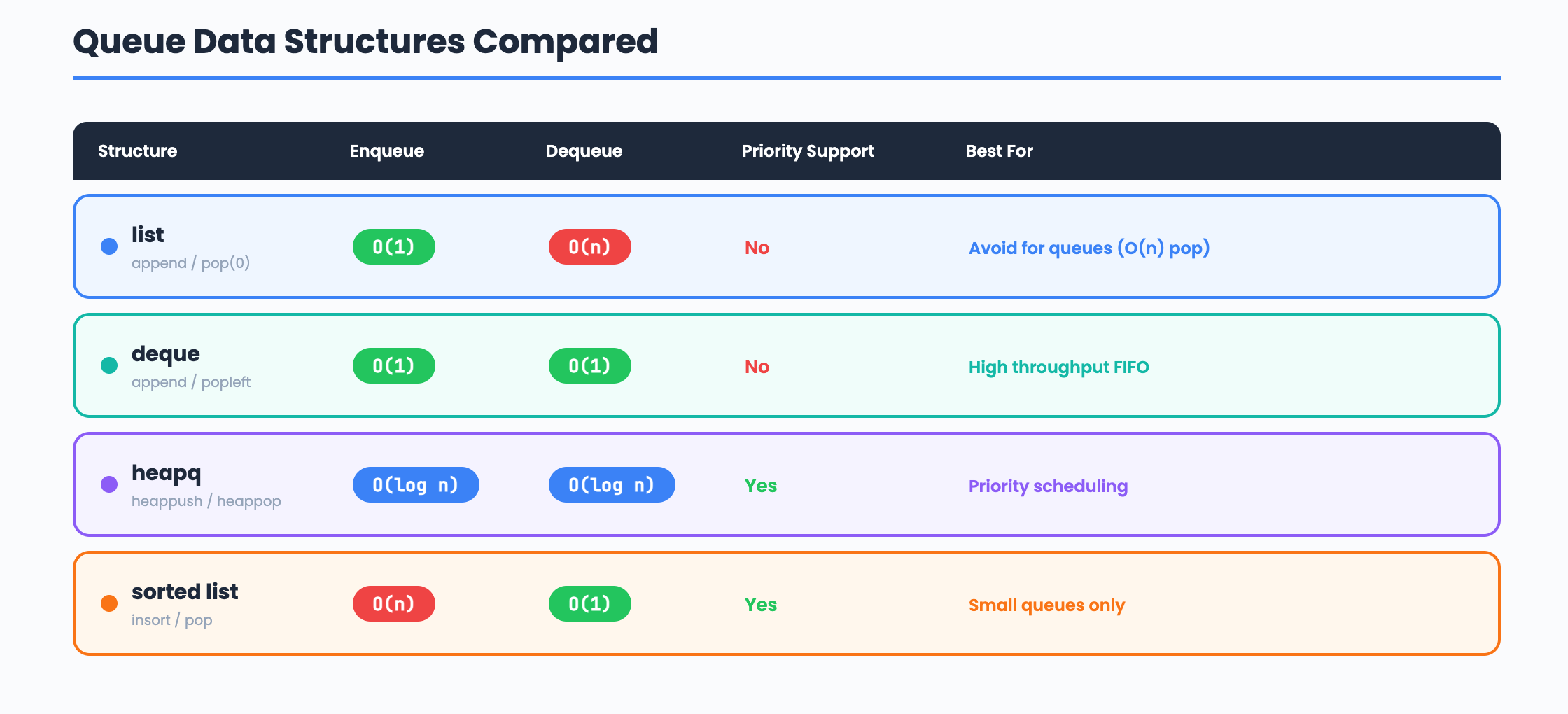
What operations must be FAST? Enqueue and dequeue must both be efficient. A heap (heapq) gives us O(log n) enqueue and O(log n) dequeue, with the highest priority task always at the top. For a FIFO queue without priorities, a deque gives O(1) for both operations.
What is the core LOGIC? Priority based scheduling. Each task has a priority level. The worker always picks the highest priority task first. When priorities are equal, tasks execute in FIFO order. Workers run in separate threads and compete for tasks using a thread safe queue.
Pattern:    Producer-Consumer (decouple submit from execute)
Structure:  heapq (priority queue) or deque (FIFO)
Algorithm:  Priority scheduling with worker thread pool
Step 1: The Task Class
Every task needs an ID, a priority, a callable function, and metadata for tracking retries and status.
import time
import uuid

class Task:
    def __init__(self, fn, args=None, kwargs=None, priority=0, max_retries=3):
        self.id = str(uuid.uuid4())[:8]
        self.fn = fn
        self.args = args or ()
        self.kwargs = kwargs or {}
        self.priority = priority
        self.max_retries = max_retries
        self.attempts = 0
        self.status = "pending"
        self.result = None
        self.error = None
        self.created_at = time.time()
        self.completed_at = None

    def __lt__(self, other):
        """Lower number = higher priority. Ties broken by creation time."""
        if self.priority == other.priority:
            return self.created_at < other.created_at
        return self.priority < other.priority

    def execute(self):
        """Run the task function and track the result."""
        self.attempts += 1
        self.status = "running"
        try:
            self.result = self.fn(*self.args, **self.kwargs)
            self.status = "completed"
            self.completed_at = time.time()
            return True
        except Exception as e:
            self.error = str(e)
            if self.attempts >= self.max_retries:
                self.status = "failed"
            else:
                self.status = "pending"
            return False
The __lt__ method is the key. Python’s heapq uses this to compare tasks. Priority 0 runs before priority 10. When two tasks have the same priority, the older task runs first (FIFO within the same priority level).
Interview phrasing: “Each task is a self-contained unit of work with an ID, priority, retry counter, and status. The comparison operator lets the heap sort tasks by priority automatically.”
Step 2: The Priority Queue
A thread-safe priority queue using heapq and a lock. Workers can safely pull tasks from multiple threads.
import heapq
import threading

class PriorityTaskQueue:
    def __init__(self):
        self._heap = []
        self._lock = threading.Lock()
        self._not_empty = threading.Condition(self._lock)

    def enqueue(self, task):
        """Add a task to the queue. O(log n)."""
        with self._not_empty:
            heapq.heappush(self._heap, task)
            self._not_empty.notify()

    def dequeue(self, timeout=None):
        """Remove and return the highest priority task. Blocks if empty."""
        with self._not_empty:
            while not self._heap:
                if not self._not_empty.wait(timeout=timeout):
                    return None
            return heapq.heappop(self._heap)

    def size(self):
        with self._lock:
            return len(self._heap)

    def is_empty(self):
        with self._lock:
            return len(self._heap) == 0
The Condition variable is what makes this production-ready. Without it, workers would spin in a tight loop checking is_empty() and burning CPU. With the condition, workers sleep until notify() wakes them when a new task arrives. This is the same pattern used inside Python’s built-in queue.PriorityQueue.
Why heapq and not a sorted list? A sorted list gives O(n) insertion because it needs to shift elements. A heap gives O(log n) insertion and O(log n) removal. For a queue processing thousands of tasks per second, this difference matters.
Step 3: Worker Pool
Workers are threads that continuously pull tasks from the queue and execute them. Failed tasks are retried or sent to a dead letter queue.
import threading
import logging

logging.basicConfig(level=logging.INFO, format="%(message)s")
logger = logging.getLogger(__name__)

class WorkerPool:
    def __init__(self, queue, num_workers=4):
        self._queue = queue
        self._workers = []
        self._dead_letter = []
        self._completed = []
        self._running = False
        self._lock = threading.Lock()
        self._num_workers = num_workers

    def start(self):
        """Start all worker threads."""
        self._running = True
        for i in range(self._num_workers):
            t = threading.Thread(
                target=self._worker_loop,
                name=f"worker-{i}",
                daemon=True,
            )
            t.start()
            self._workers.append(t)
        logger.info(f"Started {self._num_workers} workers")

    def stop(self):
        """Signal workers to stop."""
        self._running = False

    def _worker_loop(self):
        """Main loop for each worker thread."""
        name = threading.current_thread().name
        while self._running:
            task = self._queue.dequeue(timeout=1.0)
            if task is None:
                continue

            logger.info(f"[{name}] Running task {task.id} (priority={task.priority})")
            success = task.execute()

            with self._lock:
                if success:
                    self._completed.append(task)
                    logger.info(f"[{name}] Task {task.id} completed")
                elif task.status == "failed":
                    self._dead_letter.append(task)
                    logger.info(f"[{name}] Task {task.id} moved to dead letter (error: {task.error})")
                else:
                    self._queue.enqueue(task)
                    logger.info(f"[{name}] Task {task.id} retry {task.attempts}/{task.max_retries}")

    def stats(self):
        with self._lock:
            return {
                "queue_size": self._queue.size(),
                "completed": len(self._completed),
                "dead_letter": len(self._dead_letter),
                "workers": self._num_workers,
            }
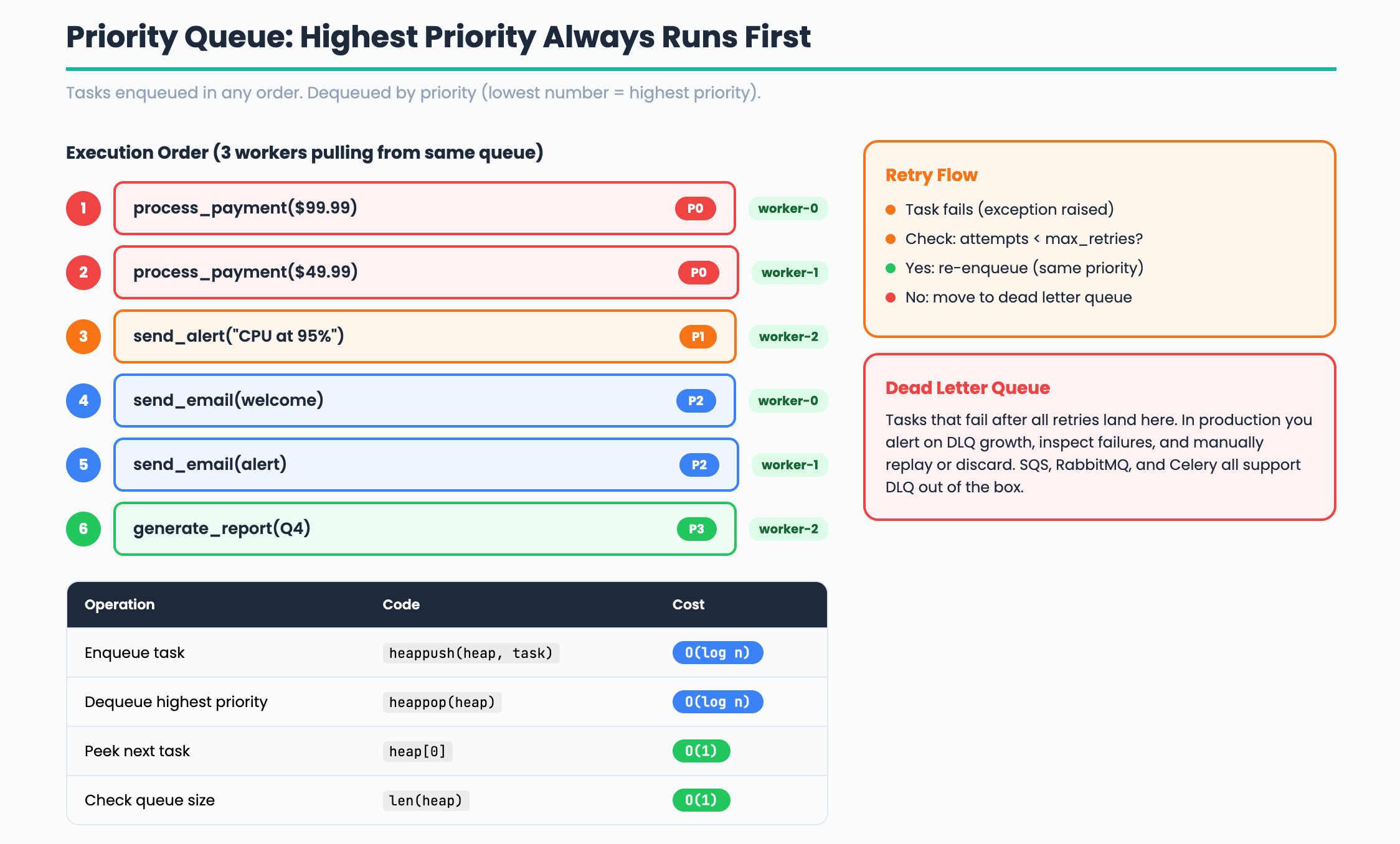
The retry pattern: When a task fails, the worker checks the attempt count against max_retries. If retries remain, the task goes back into the queue with the same priority. If all retries are exhausted, it goes to the dead letter queue. This is exactly how SQS, RabbitMQ, and Celery handle failures.
The dead letter queue: Tasks that fail after all retries need to go somewhere for investigation. In production you would alert on dead letter queue growth and manually inspect or replay failed tasks.
Step 4: Putting It Together
import time

def send_email(to, subject):
    """Simulate sending an email."""
    time.sleep(0.5)
    return f"Email sent to {to}: {subject}"

def generate_report(report_id):
    """Simulate generating a report."""
    time.sleep(1.0)
    return f"Report {report_id} generated"

def process_payment(amount):
    """Simulate a flaky payment processor."""
    import random
    if random.random() < 0.5:
        raise Exception("Payment gateway timeout")
    return f"Payment of ${amount} processed"

# Create queue and worker pool
queue = PriorityTaskQueue()
pool = WorkerPool(queue, num_workers=3)
pool.start()

# Submit tasks with different priorities
# Priority 0 = highest (payments first)
queue.enqueue(Task(process_payment, args=(99.99,), priority=0, max_retries=3))
queue.enqueue(Task(process_payment, args=(49.99,), priority=0, max_retries=3))

# Priority 1 = medium (emails)
queue.enqueue(Task(send_email, args=("user@example.com", "Welcome!"), priority=1))
queue.enqueue(Task(send_email, args=("admin@example.com", "Alert"), priority=1))

# Priority 2 = low (reports)
queue.enqueue(Task(generate_report, args=("Q4-2024",), priority=2))
queue.enqueue(Task(generate_report, args=("annual",), priority=2))

# Wait for processing
time.sleep(5)
print(pool.stats())
pool.stop()
Payments run first (priority 0). Emails run next (priority 1). Reports run last (priority 2). If a payment fails, it retries up to 3 times before moving to the dead letter queue. All of this happens concurrently across 3 worker threads.
Comparison: Queue Data Structures
Scaling to Millions: Task Queues at Production Scale
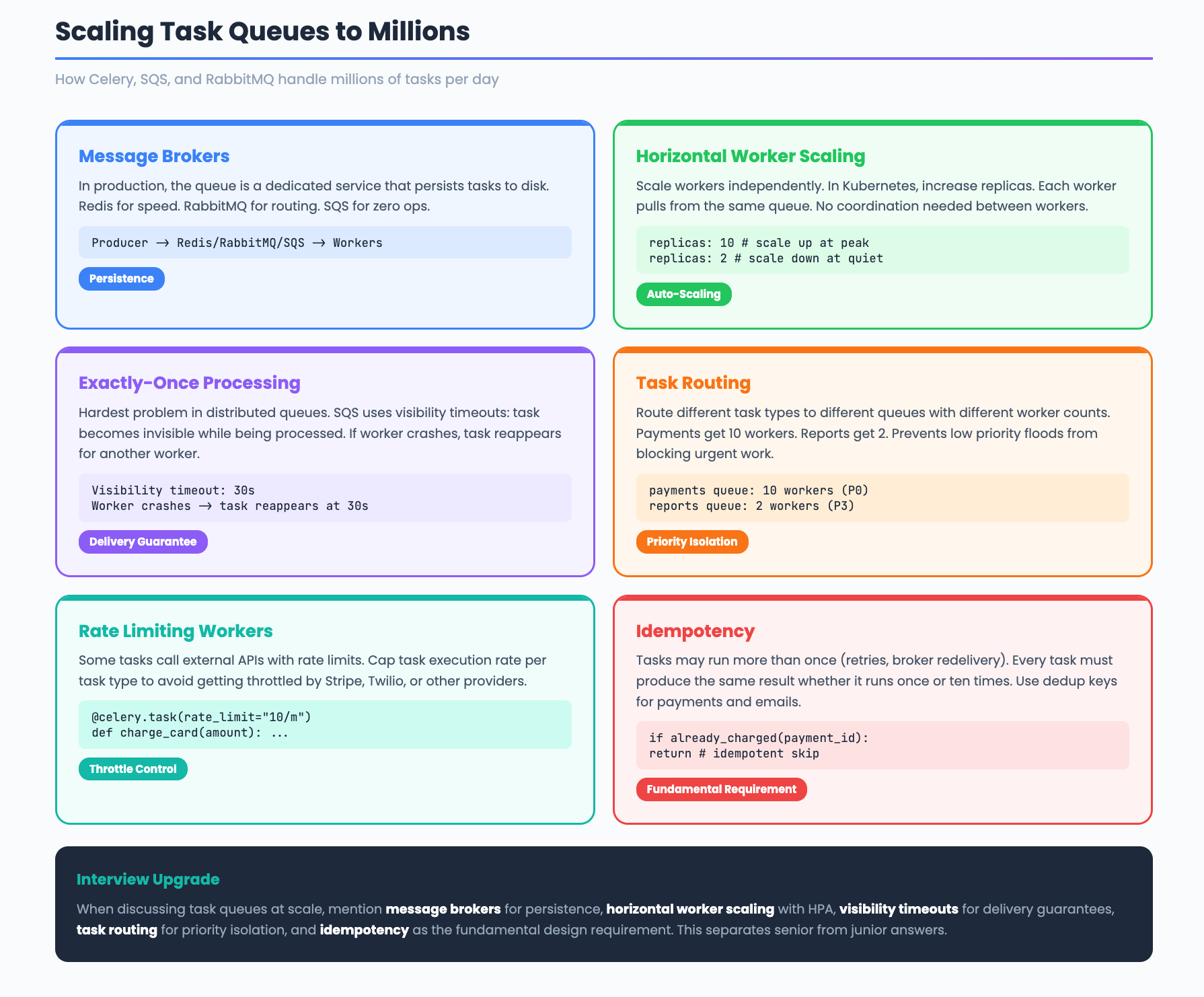
Our task queue runs in a single process. Production systems like Celery, SQS, and RabbitMQ handle millions of tasks per day across distributed clusters. Here is how they scale.
Message Brokers
In production, the queue is not an in-memory heap. It is a dedicated message broker that persists tasks to disk. Redis, RabbitMQ, and SQS are the three most common. Redis is fastest for simple queues. RabbitMQ supports complex routing patterns. SQS is fully managed with zero operational overhead.
Producer -> Message Broker -> Consumer
(your API)   (Redis/RabbitMQ)  (Celery worker)
The broker decouples producers and consumers completely. Producers do not need to know which worker will execute their task. Workers do not need to know who submitted the task.
Horizontal Worker Scaling
Adding more workers is the primary scaling mechanism. In Kubernetes, you set the replica count on your worker deployment and the scheduler distributes pods across nodes. Each worker pulls tasks independently. There is no coordination between workers.
replicas: 10 # 10 worker pods pulling from the same queue
At peak load, you scale up workers. During quiet periods, you scale down. Kubernetes Horizontal Pod Autoscaler (HPA) can do this automatically based on queue depth.
Exactly-Once Processing
The hardest problem in distributed task queues is ensuring each task runs exactly once. Network failures and worker crashes create two risks. A task might run twice (at-least-once delivery) or never run at all (at-most-once delivery).
SQS solves this with visibility timeouts. When a worker picks up a task, the task becomes invisible to other workers for a configurable period. If the worker finishes, it deletes the task. If the worker crashes, the visibility timeout expires and another worker picks up the task.
Task Routing and Queues
Production systems route different task types to different queues. High priority tasks go to a fast queue with many workers. Low priority tasks go to a slow queue with fewer workers. This prevents a flood of low priority tasks from blocking urgent ones.
High priority queue:  payments, alerts     (10 workers)
Default queue:        emails, webhooks     (5 workers)
Low priority queue:   reports, analytics   (2 workers)
Celery calls these “task routes.” RabbitMQ calls them “exchanges and bindings.” The concept is the same.
Rate Limiting Workers
Some tasks call external APIs with rate limits. If 10 workers all hit the Stripe API simultaneously, you get throttled. Production task queues support per-task rate limiting. Celery uses rate_limit="10/m" to cap a task type at 10 executions per minute across all workers.
Idempotency
Since tasks might run more than once (due to retries or broker redelivery), every task must be idempotent. Running a task twice should produce the same result as running it once. For payments, this means checking if the payment was already processed before charging again. For emails, this means using a deduplication key.
Interview upgrade: When discussing task queues at scale, mention message brokers for persistence, horizontal worker scaling with HPA, visibility timeouts for exactly-once semantics, task routing for priority isolation, and idempotency as the fundamental design requirement.
The DevOps Connection
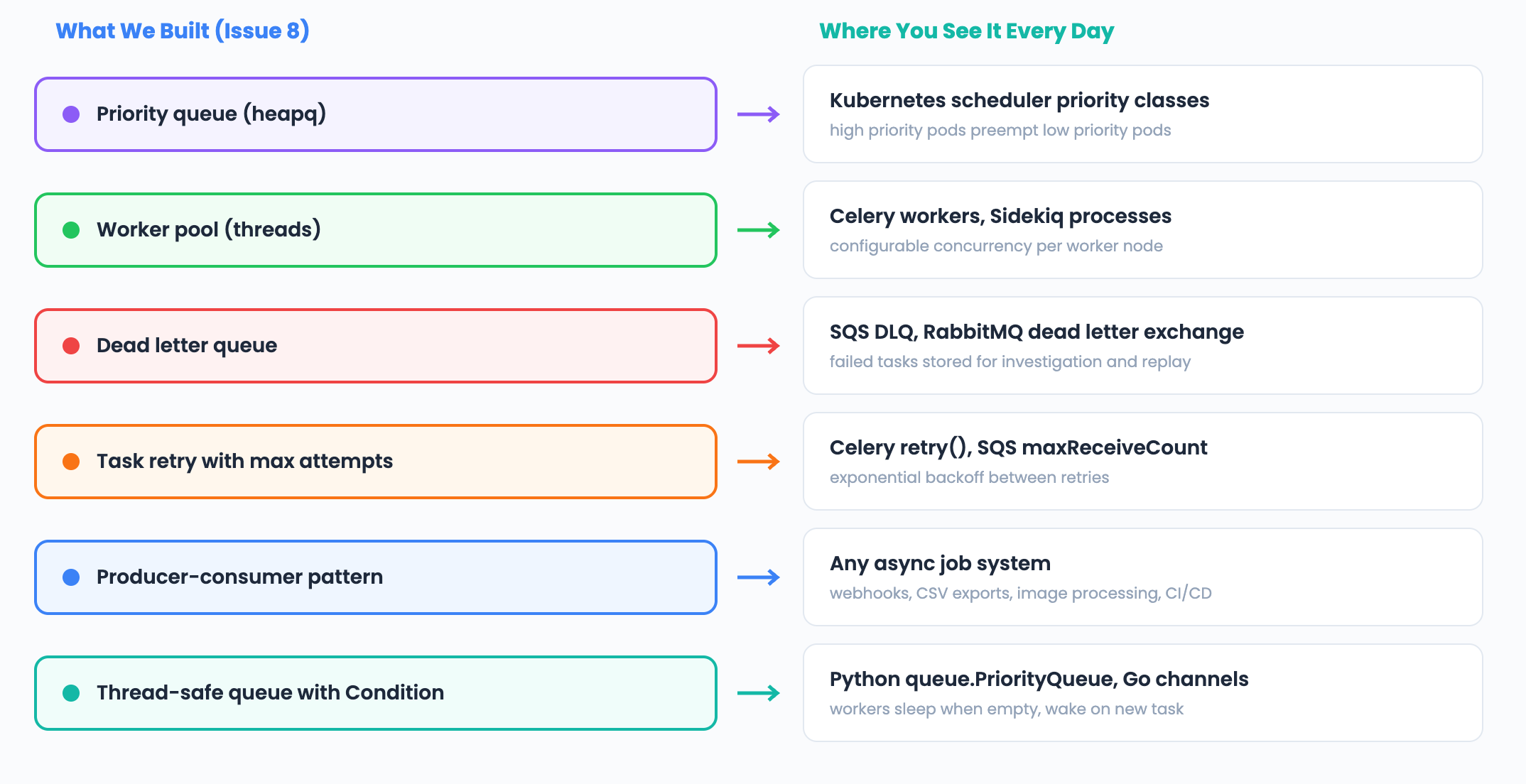
Interview Walkthrough Script
When the interviewer asks “Design a task queue”:
“I would use the Producer-Consumer pattern with a priority heap as the core data structure. Producers submit tasks with a priority level. Workers pull from the heap, always getting the highest priority task first. For thread safety I use a condition variable so workers sleep when the queue is empty instead of spinning. Failed tasks retry up to N times, then move to a dead letter queue for investigation. For production scale, I would use Redis or SQS as the message broker, horizontal worker scaling with Kubernetes HPA based on queue depth, and ensure every task is idempotent since exactly-once delivery is impossible in distributed systems.”
Challenge: Try It Yourself
Exponential backoff. Instead of retrying immediately, wait 1 second, then 2, then 4. Multiply the delay by 2 on each retry.
Task dependencies. Implement a system where Task B only runs after Task A completes. Hint: add a
depends_onfield and check completion before dequeuing.Rate limiting. Add a rate limiter to the worker pool that caps execution at N tasks per second. Use the token bucket from Issue 5.
Next week: Build Autocomplete in Python Using a Trie
Previous: Build a DNS Resolver | Build a Load Balancer | Build a Rate Limiter