

Last week, we built a key-value store in Python with TTL support. One problem: kill the process and everything disappears.
That’s fine for a cache. It’s not fine for a database. So how do real databases like Redis, PostgreSQL, and Kafka survive crashes without losing data?
They all use the same two techniques: write-ahead logs and snapshots. Today, you’ll implement both from scratch.
The 3-Question Framework
What does the system DO? Our persistence layer records every mutation to disk so state can be rebuilt after a crash. This is the Observer pattern — the store publishes events (writes), and the persistence layer observes and records them.
What operations must be FAST? Writing to disk on every PUT must not kill performance. Sequential append to a file is the fastest disk operation — O(1) per write. We need an append-only list (a file).
What’s the core LOGIC? Two algorithms working together:
Write-Ahead Log (WAL): Append every operation to a file before confirming it. On crash, replay the file.
Snapshotting: Periodically dump the entire state to disk. On restart, load the snapshot first, then replay only the WAL entries after it.
Pattern:    Observer (store publishes writes → persistence layer records them)
Structure:  Append-only file (sequential writes — fastest disk I/O)
Algorithms: WAL replay + periodic snapshotting + log compaction
Why Append-Only? The Disk I/O Insight
This is the kind of insight that impresses in interviews:
Random writes to disk:    ~0.1 MB/s  (seek time dominates)
Sequential appends:       ~500 MB/s  (5000x faster!)

Writing the entire file on every PUT → random I/O → slow
Appending one line on every PUT → sequential I/O → fast
This is why databases don’t just overwrite a JSON file on every change. They append to a log. It’s the same reason Kafka is fast — it’s fundamentally an append-only log.
As a DevOps engineer, you’ve seen this tradeoff in redis.conf:
# Redis AOF fsync policies — same concept we're building
appendfsync always      # fsync every write (safest, slowest)
appendfsync everysec    # fsync once per second (default — good balance)
appendfsync no          # let OS decide (fastest, riskiest)
Step 1: Write-Ahead Log (WAL)
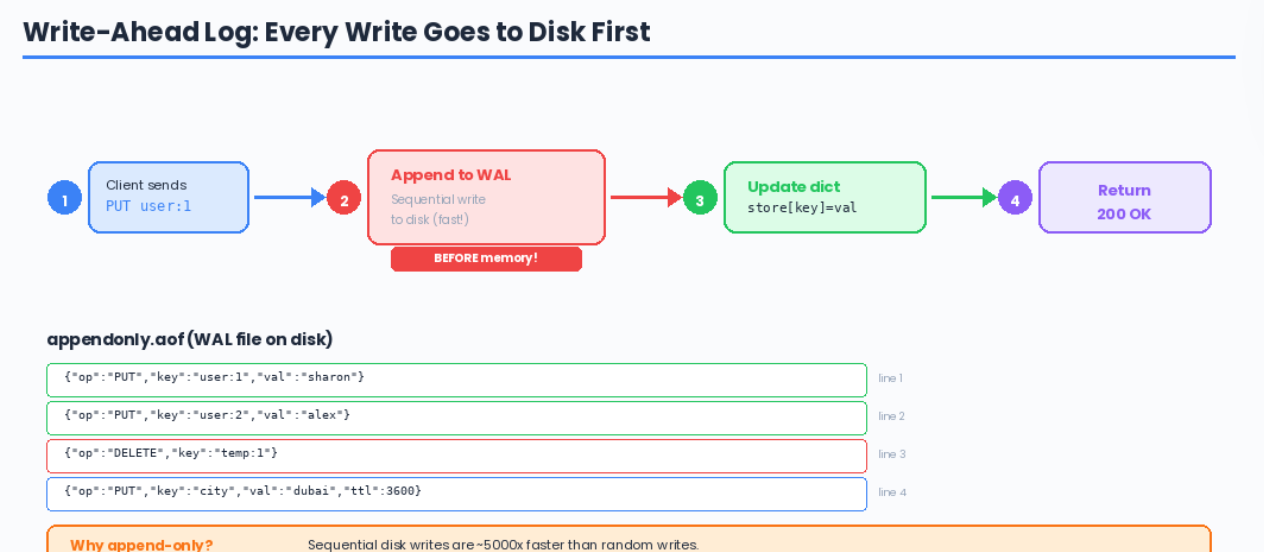
The WAL is simple: before confirming any write to the client, append the operation to a file. If the process crashes, replay the file on startup.
import json
import os
import time

class WriteAheadLog:
    def __init__(self, path="appendonly.aof"):
        self.path = path
        self._file = open(path, "a")

    def append(self, operation: dict):
        """Append one operation to the log — O(1) sequential write"""
        self._file.write(json.dumps(operation) + "\n")
        self._file.flush()       # push to OS buffer
        # os.fsync(self._file.fileno())  # uncomment for full durability

    def replay(self):
        """Read all operations from disk to rebuild state"""
        if not os.path.exists(self.path):
            return []
        with open(self.path, "r") as f:
            operations = []
            for line in f:
                if line.strip():
                    operations.append(json.loads(line))
            return operations

    def truncate(self):
        """Clear the log (called after a snapshot)"""
        self._file.close()
        self._file = open(self.path, "w")  # overwrite with empty file

    def close(self):
        self._file.close()
What flush() vs fsync() Actually Means
This distinction comes up in interviews, and you already understand it from managing databases:
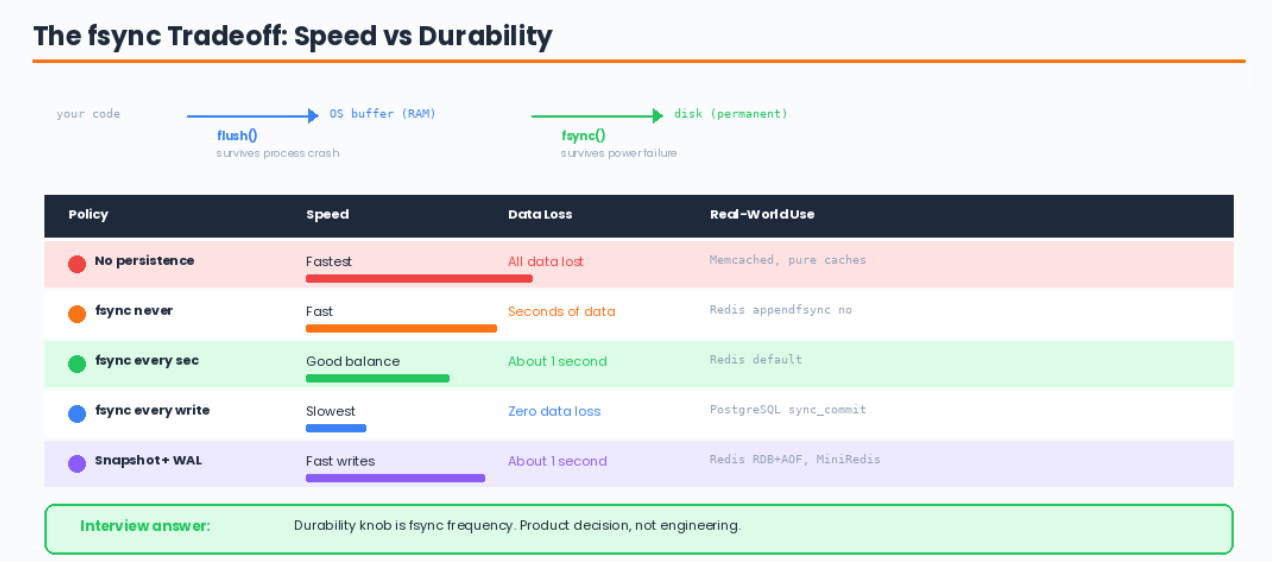
your code          →  OS buffer (RAM)  →  disk (permanent)
                   ↑                   ↑
              flush()              fsync()

flush(): "I'm done writing, push my data to the OS"
         Data is in the OS page cache — survives your process crashing
         Does NOT survive a power failure

fsync(): "Force the OS to write to physical disk RIGHT NOW"
         Survives power failure
         But costs ~1-10ms per call (huge at high throughput)
Redis appendfsync everysec calls fsync once per second — losing at most 1 second of data on power failure. That’s the sweet spot.
Step 2: Snapshots (RDB-Style)
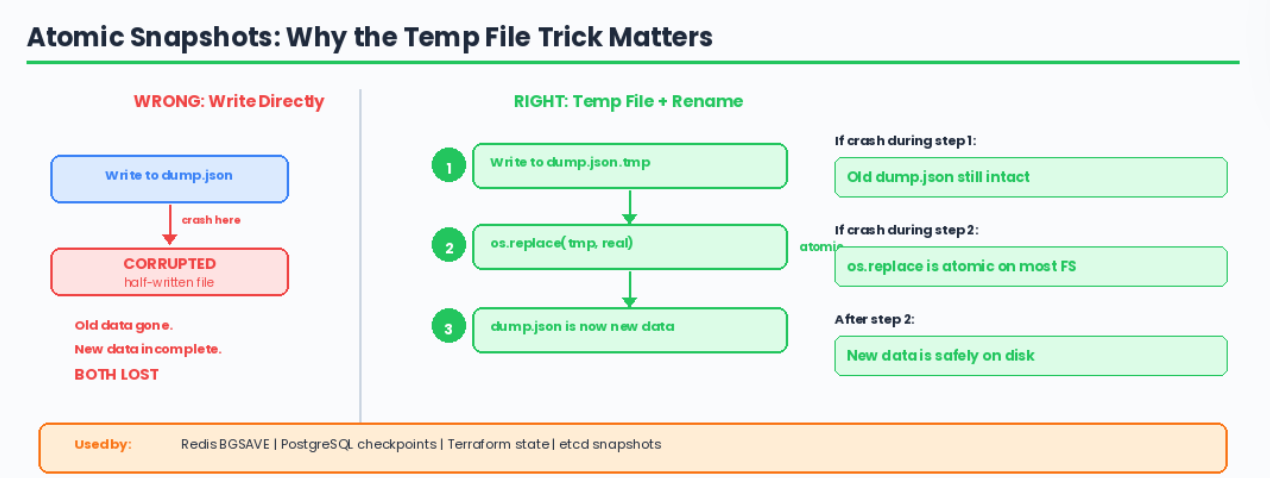
Snapshots dump the entire in-memory state to a file periodically. On restart, loading a snapshot is instant — no need to replay thousands of log entries.
import json
import os
import time
import threading

class SnapshotManager:
    def __init__(self, path="dump.rdb.json"):
        self.path = path

    def save(self, store_data: dict):
        """Atomic snapshot: write to temp file, then rename"""
        snapshot = {
            "timestamp": time.time(),
            "num_keys": len(store_data),
            "data": store_data
        }

        # Write to temp file first
        tmp_path = self.path + ".tmp"
        with open(tmp_path, "w") as f:
            json.dump(snapshot, f)

        # Atomic rename — this is the trick
        # If we crash during json.dump, the old snapshot is still intact
        # os.replace is atomic on most filesystems
        os.replace(tmp_path, self.path)

    def load(self) -> dict:
        """Load snapshot from disk"""
        if not os.path.exists(self.path):
            return {}
        with open(self.path, "r") as f:
            snapshot = json.load(f)
        print(f"Snapshot loaded: {snapshot['num_keys']} keys "
              f"(saved at {time.ctime(snapshot['timestamp'])})")
        return snapshot["data"]
Why the Temp File + Rename?
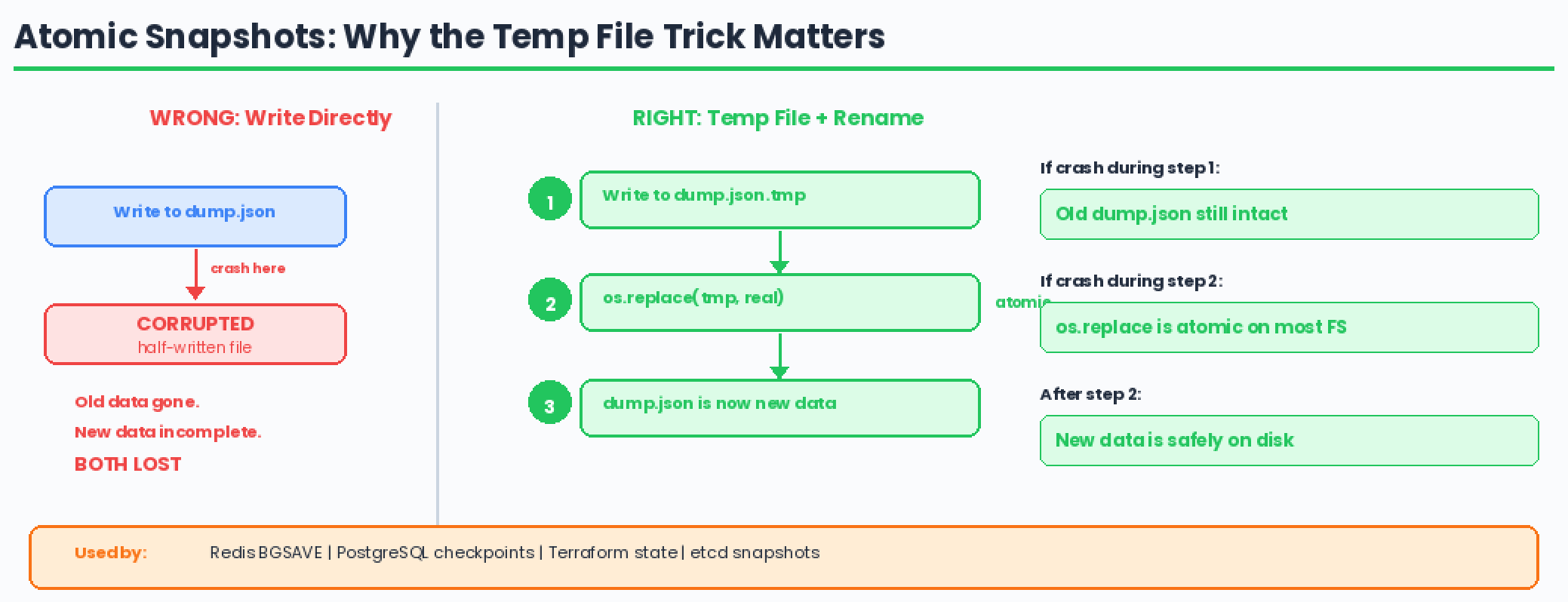
This is an important systems concept. If you write directly to dump.rdb.json and crash halfway through, you’ve corrupted both the old data AND the new data.
By writing to a temp file and atomically renaming, either the old file or the new file exists — never a half-written one.
Redis does exactly this with its BGSAVE command. PostgreSQL does this with WAL checkpoints. You’ve probably seen .tmp files in production systems — now you know why they exist.
Step 3: Putting It All Together — MiniRedis
Now we integrate both persistence strategies with our key-value store:
import json
import os
import time
import threading

class MiniRedis:
    def __init__(self, wal_path="appendonly.aof", snapshot_path="dump.rdb.json",
                 snapshot_interval=300):
        self._store = {}
        self.wal = WriteAheadLog(wal_path)
        self.snapshots = SnapshotManager(snapshot_path)
        self.snapshot_interval = snapshot_interval
        self._write_count = 0

        # Recovery: snapshot first, then replay WAL
        self._recover()

        # Background snapshots
        self._start_auto_snapshot()

    def _recover(self):
        """
        Recovery order (same as Redis):
        1. Load snapshot  → gets bulk of data instantly
        2. Replay WAL     → applies writes since last snapshot
        """
        # Step 1: Load snapshot
        snapshot_data = self.snapshots.load()
        self._store = snapshot_data

        # Step 2: Replay WAL on top of snapshot
        operations = self.wal.replay()
        for op in operations:
            if op["op"] == "PUT":
                self._store[op["key"]] = {
                    "value": op["value"],
                    "expiry": op.get("expiry")
                }
            elif op["op"] == "DELETE":
                self._store.pop(op["key"], None)

        wal_count = len(operations)
        total = len(self._store)
        print(f"Recovery complete: {total} keys "
              f"({total - wal_count} from snapshot, {wal_count} from WAL)")

    # ── Core Operations ──

    def put(self, key, value, ttl_seconds=None):
        expiry = time.time() + ttl_seconds if ttl_seconds else None
        entry = {"value": value, "expiry": expiry}

        # WAL first, then memory (write-AHEAD log)
        self.wal.append({
            "op": "PUT", "key": key,
            "value": value, "expiry": expiry
        })
        self._store[key] = entry
        self._write_count += 1

    def get(self, key):
        entry = self._store.get(key)
        if entry is None:
            return None
        if entry["expiry"] and time.time() > entry["expiry"]:
            self.delete(key)
            return None
        return entry["value"]

    def delete(self, key):
        if key in self._store:
            self.wal.append({"op": "DELETE", "key": key})
            del self._store[key]
            return True
        return False

    def keys(self):
        now = time.time()
        return [
            k for k, v in self._store.items()
            if v["expiry"] is None or now <= v["expiry"]
        ]

    def dbsize(self):
        return len(self._store)

    # ── Snapshot Management ──

    def save(self):
        """Manual snapshot — like Redis BGSAVE"""
        self.snapshots.save(self._store.copy())
        self.wal.truncate()     # WAL is now redundant — snapshot has everything
        self._write_count = 0
        print(f"Snapshot saved: {len(self._store)} keys. WAL truncated.")

    def _start_auto_snapshot(self):
        """Background thread — like Redis save 300 10"""
        def auto_save():
            while True:
                time.sleep(self.snapshot_interval)
                if self._write_count > 0:
                    self.save()
        t = threading.Thread(target=auto_save, daemon=True)
        t.start()
Step 4: Testing the Crash-Recovery Cycle
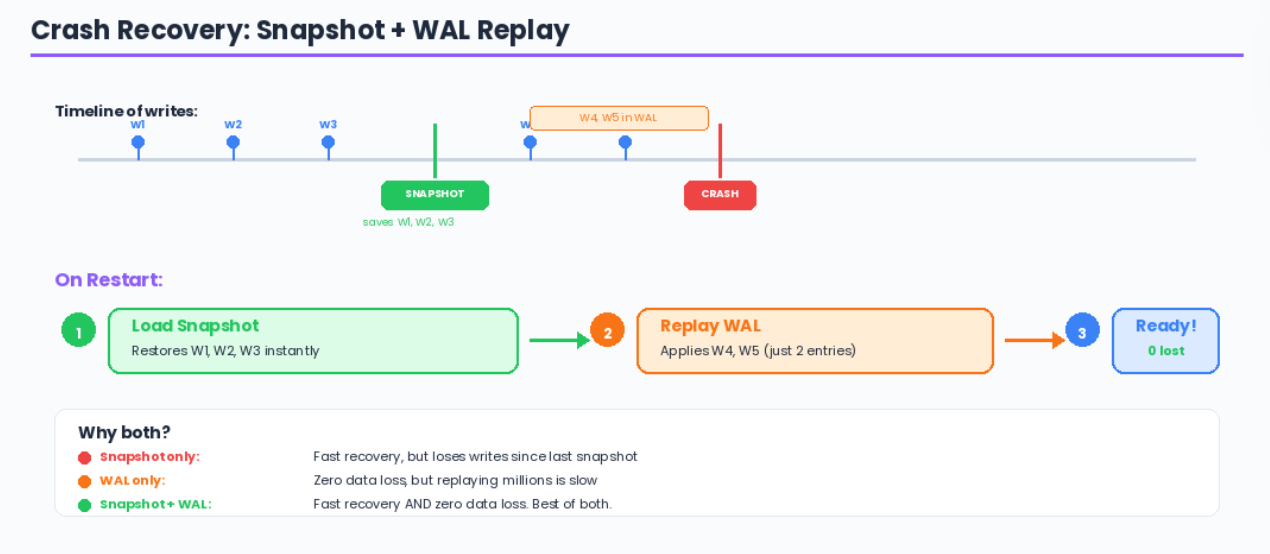
Let’s prove it works:
# === Session 1: Write data ===
store = MiniRedis(snapshot_interval=10)

store.put("user:1", "sharon")
store.put("user:2", "alex")
store.put("city", "dubai", ttl_seconds=3600)
store.put("temp_key", "delete_me")
store.delete("temp_key")

print(f"Keys: {store.keys()}")
# Keys: ['user:1', 'user:2', 'city']

# Force a snapshot
store.save()
# Snapshot saved: 3 keys. WAL truncated.

# Write more data AFTER the snapshot
store.put("user:3", "jordan")
store.put("user:4", "casey")

# Now imagine the process crashes here...
# The WAL has user:3 and user:4
# The snapshot has user:1, user:2, city
# === Session 2: Restart after "crash" ===
store = MiniRedis(snapshot_interval=10)
# Output:
# Snapshot loaded: 3 keys (saved at Thu Feb 27 20:30:00 2026)
# Recovery complete: 5 keys (3 from snapshot, 2 from WAL)

print(store.get("user:1"))    # "sharon"  — from snapshot
print(store.get("user:4"))    # "casey"   — from WAL replay
print(store.get("temp_key"))  # None      — correctly deleted
Nothing was lost. The snapshot provided most of the data instantly, and the WAL filled in the gaps.
The Recovery Timeline (What Interviewers Want to Hear)
Timeline of writes:
─────────────────────────────────────────────────────►

 write  write  write  SNAPSHOT  write  write  CRASH
  1      2      3     (saves     4      5
                       1,2,3)         ↑ these are
                                       in the WAL

On restart:
1. Load snapshot    → restores keys 1, 2, 3       (instant)
2. Replay WAL       → restores keys 4, 5          (fast)
3. Ready to serve   → lost: 0 keys
The fsync Tradeoff Table
How This Maps to Your DevOps World
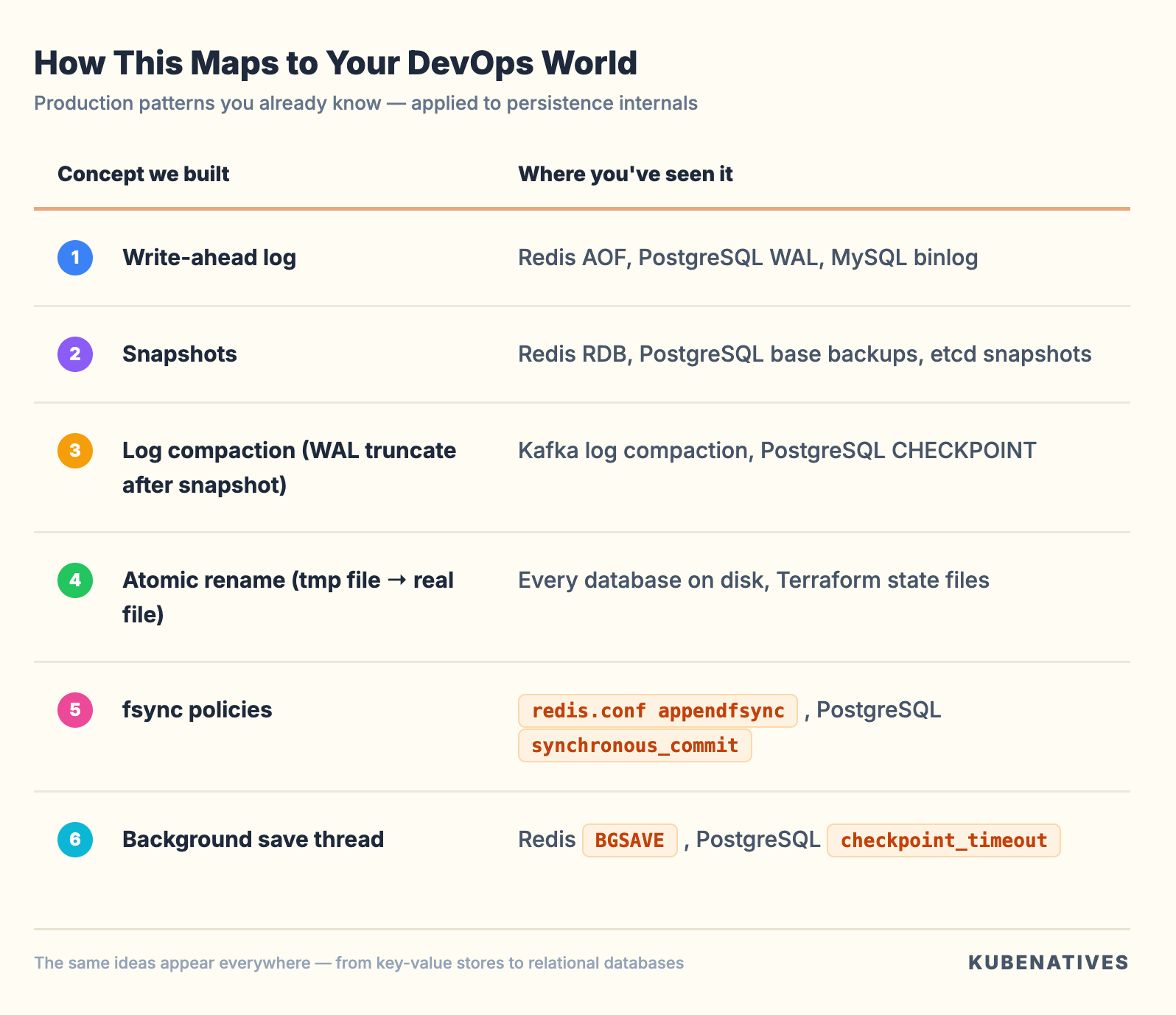
You’ve been configuring these settings in production for years. Now you can implement them and explain why they exist.
Interview Walkthrough Script
When the interviewer extends “Design a key-value store” with “How would you make it persistent?”:
“I’d combine two persistence strategies — write-ahead logging and periodic snapshots.
For every write, I’d append the operation to an append-only file before updating memory. This is sequential I/O — about 5000x faster than random writes. On crash, I replay the log to rebuild state.
The problem is the log grows forever and replay gets slow. So I’d run periodic snapshots — dump the entire state to a file using an atomic write (temp file + rename). After each snapshot, I truncate the log.
On recovery: load the snapshot first for speed, then replay only the WAL entries since that snapshot. You get fast recovery plus minimal data loss.
The durability knob is fsync frequency — fsync every write for zero data loss, or every second for a good balance. That’s a product decision, not an engineering one.”
Challenge: Try It Yourself
Extend MiniRedis with these features (solutions next week):
fsync policies: Add a
fsync_policyparameter that supports"always","everysec", and"no". Implement the"everysec"mode using a background thread.WAL compaction without snapshot: Instead of truncating the WAL after a snapshot, rewrite it with only the current state. This is what Redis
BGREWRITEAOFdoes.Binary protocol: Right now the WAL uses JSON (human-readable but large). Implement a binary format using
struct.packfor the WAL entries. Compare file sizes.
Next week in Crack That Weekly: Implement TTL & Key Expiry in Python — we’ll build both lazy and active expiration, exactly how Redis handles millions of expiring keys without scanning them all.
Previous issue: Build Your Own Redis: Key-Value Store From Scratch
About Crack That Weekly: A weekly newsletter that bridges the gap between real-world DevOps experience and coding interview prep. Every issue builds a real system from scratch in Python, connecting design patterns, data structures, and algorithms to tools you already use.
Written by Sharon Sahadevan, a DevOps engineer who got tired of interview prep that ignores operational experience.